

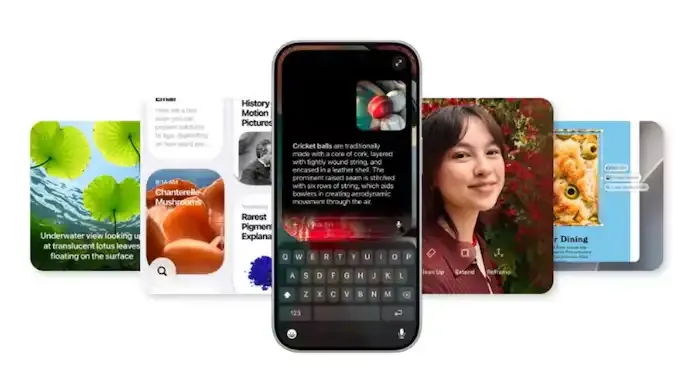

Apple has officially released the iOS 27 Public Beta, allowing eligible iPhone users to experience its next-generation software months before the stable release expected alongside the iPhone 18 series later this year.
Announced during WWDC 2026, iOS 27 marks Apple's biggest artificial intelligence-focused update yet, with the completely redesigned Siri AI taking centre stage. The update also introduces smarter Apple Intelligence features, improved Photos editing, Safari enhancements, performance upgrades and several quality-of-life improvements across the operating system.
Here's everything you need to know about the iOS 27 Public Beta, its new features, supported devices and installation process.

Siri AI becomes Apple's biggest upgrade
The standout feature in iOS 27 is the transformation of Siri into Siri AI, Apple's next-generation intelligent assistant.
Powered by Google's Gemini AI models, Siri AI now functions as a conversational assistant capable of understanding context, follow-up questions and complex requests.
Unlike previous versions, Siri AI can:
- Hold natural multi-turn conversations.
- Understand follow-up questions without repeating context.
- Search personal information across Mail, Messages, Notes, Calendar, Reminders and other apps.
- Perform actions inside supported applications.
- Respond based on what's currently displayed on the screen.
- Store conversation history securely through iCloud.
Apple has also introduced controls that let users customise Siri's speaking style, pace and expressiveness.
However, Siri AI is available only on Apple Intelligence-supported devices, including the iPhone 15 Pro and newer models. The feature currently supports select English languages and remains unavailable in the European Union.
Apple Intelligence expands across apps
Apple has integrated AI-powered features into several native applications.
Photos gets smarter editing tools
The Photos app now includes a more capable Clean Up tool that removes unwanted objects more accurately than before.
Other additions include:
- AI-powered Extend feature to expand image backgrounds.
- Spatial Reframing that adjusts the apparent camera angle after capturing a photo.
- Improved editing workflows powered by Apple Intelligence.
Safari becomes more intelligent
Safari receives one of its biggest upgrades in recent years.
New capabilities include:
- Automatic tab organisation by topic.
- Smarter bookmark and Reading List grouping.
- Website change monitoring.
- AI-generated browser extensions created using natural language prompts.
These features aim to improve browsing productivity while reducing manual organisation.
Passwords and Shortcuts receive AI enhancements
Apple has expanded AI assistance beyond productivity apps.
The Passwords app can now automatically replace eligible weak or compromised passwords.
Meanwhile, Shortcuts supports natural-language automation creation, allowing users to build workflows simply by describing what they want.
The Calendar app also gains natural-language event creation, while system-wide writing tools now provide grammar corrections alongside spelling suggestions.
Faster performance across iOS 27
Apple says iOS 27 isn't just smarter—it's significantly faster.
According to the company:
- Apps launch up to 30% faster.
- Newly captured photos appear up to 70% faster.
- AirDrop transfers can be up to 80% faster.
These optimisations aim to improve everyday responsiveness across compatible devices.
More customization and quality-of-life improvements
Apple has refined its Liquid Glass interface with a new appearance slider that lets users adjust transparency levels from ultra-clear to fully tinted.
Other notable additions include:
- Separate alarm volume control.
- Background sending for large media files in Messages.
- Full-resolution Shared Albums in Photos.
- Expanded contribution controls in shared libraries.
- Redesigned Screen Time dashboard.
- Enhanced parental controls.
- Custom AirPods equaliser for bass, mids and treble adjustments.
Supported iPhones
The iOS 27 Public Beta supports:
- iPhone 11 series and newer.
- iPhone SE (2nd generation and later).
However, Siri AI and several Apple Intelligence features require an iPhone 15 Pro or newer.
How to install the iOS 27 Public Beta
Apple has made the beta available free of charge without requiring a developer account.
Before installing, users should back up their iPhone since beta software may contain bugs, reduced battery life and compatibility issues.
Steps to install:
- Open Safari on your iPhone and visit Apple's Beta Software Program website.
- Sign in using your Apple Account.
- Join the Beta Software Program if you haven't already.
- Accept Apple's beta agreement.
- Go to Settings > General > Software Update.
- Select the iOS 27 Public Beta and begin the installation.
Alongside iOS 27, Apple has also released public beta versions of iPadOS 27, macOS 27 Golden Gate, and watchOS 27.
The stable version of iOS 27 is expected to launch later this year with Apple's next-generation iPhone lineup.
Key Highlights
- Apple has officially released the iOS 27 Public Beta.
- Siri AI is the biggest feature, powered by Google's Gemini AI models.
- Apple Intelligence now enhances Photos, Safari, Passwords and Shortcuts.
- iOS 27 promises faster app launches, AirDrop transfers and photo processing.
- New customization options include Liquid Glass controls and separate alarm volume.
- Siri AI requires an iPhone 15 Pro or newer.
- The stable iOS 27 release is expected alongside the iPhone 18 series.
FAQs
What is the biggest feature in iOS 27?
The biggest addition is Siri AI, Apple's redesigned AI-powered virtual assistant capable of conversational interactions, app actions and personal context understanding.
Which iPhones support iOS 27?
The update supports iPhone 11 and newer, including the iPhone SE (2nd generation and later).
Which devices support Siri AI?
Siri AI requires Apple Intelligence-compatible devices, including the iPhone 15 Pro, iPhone 15 Pro Max, and newer models.
Is the iOS 27 Public Beta free?
Yes. Apple offers the public beta free through its Beta Software Program without requiring a developer account.
Should you install the public beta?
Public beta versions may contain bugs, reduced battery life and app compatibility issues. Users should back up their devices before installing and avoid using beta software on primary devices if stability is critical.







Conversation
Be kind and stay on topic. Comments are moderated; abuse, spam and personal attacks are removed. Report a problem